Xlsxrb
A Ruby library for reading and writing XLSX files with streaming support.
Drop-in compatibility adapters for peer Ruby XLSX libraries are available at xlsxrb-adapters.
Motivation
The Ruby ecosystem has several XLSX libraries designed for specific tradeoffs:
| Library | Read | Write | Streaming | In-Memory |
|---|---|---|---|---|
| roo | ✅ | ❌ | ✅ | ❌ |
| creek | ✅ | ❌ | ✅ | ❌ |
| xsv | ✅ | ❌ | ✅ | ❌ |
| simple_xlsx_reader | ✅ | ❌ | ✅ | ❌ |
| caxlsx / axlsx | ❌ | ✅ | ❌ | ✅ |
| write_xlsx | ❌ | ✅ | ❌ | ✅ |
| xlsxtream | ❌ | ✅ | ✅ | ❌ |
| fast_excel | ❌ | ✅ | ✅ | ❌ |
| rubyXL | ✅ | ✅ | ❌ | ✅ |
| xlsxrb | ✅ | ✅ | ✅ | ✅ |
These libraries make different architectural tradeoffs: * Streaming Model: Writes or reads rows sequentially on-the-fly to maintain a constant $O(1)$, low-memory footprint regardless of dataset size. * In-Memory Model: Builds a complete document object model, offering flexible random access, cell updates, and document templates at the cost of memory usage on large spreadsheets.
Maintaining a gem that supports both reading and writing across streaming and in-memory models, alongside OOXML features and specification compatibility, involves significant ongoing maintenance overhead.
xlsxrb addresses this through automated workflows: AI coding agents handle routine maintenance tasks such as end-to-end testing, visual regression testing, schema compliance checks, and documentation synchronization, enabling sustainable maintenance of both streaming and in-memory architectures.
Design Principles
-
Zero Runtime Dependencies: Built strictly on the Ruby standard library and bundled gems (
zlib,rexml, etc.) with zero third-party runtime dependencies. -
Streaming Support: Constant $O(1)$ memory streaming for reading and writing spreadsheets.
-
OpenXML Interoperability: Compliant with ISO/IEC 29500 (ECMA-376) and validated against the Microsoft Open XML SDK.
-
AI-Assisted Maintenance: Uses AI coding agents for automated quality assurance and verification workflows. Operational guidelines are defined in AGENTS.md.
-
Ruby 4.0+: Requires Ruby 4.0 or higher.
Autonomous Quality Assurance
To maintain its multi-layered QA suite (Steep static typing, 100% mutation kill rate across 38 subjects, ECMA-376 XSD validation, and $O(1)$ streaming memory) without high manual maintenance overhead, xlsxrb defines remediation workflows for AI coding agents (AGENTS.md, docs/QA_AGENTS.md).
Installation
bundle add xlsxrb
# Or without Bundler: gem install xlsxrb
Interactive Playground (WebAssembly)
Try xlsxrb directly in your browser without installing anything!
👉 Try the Live Demo / Interactive Playground
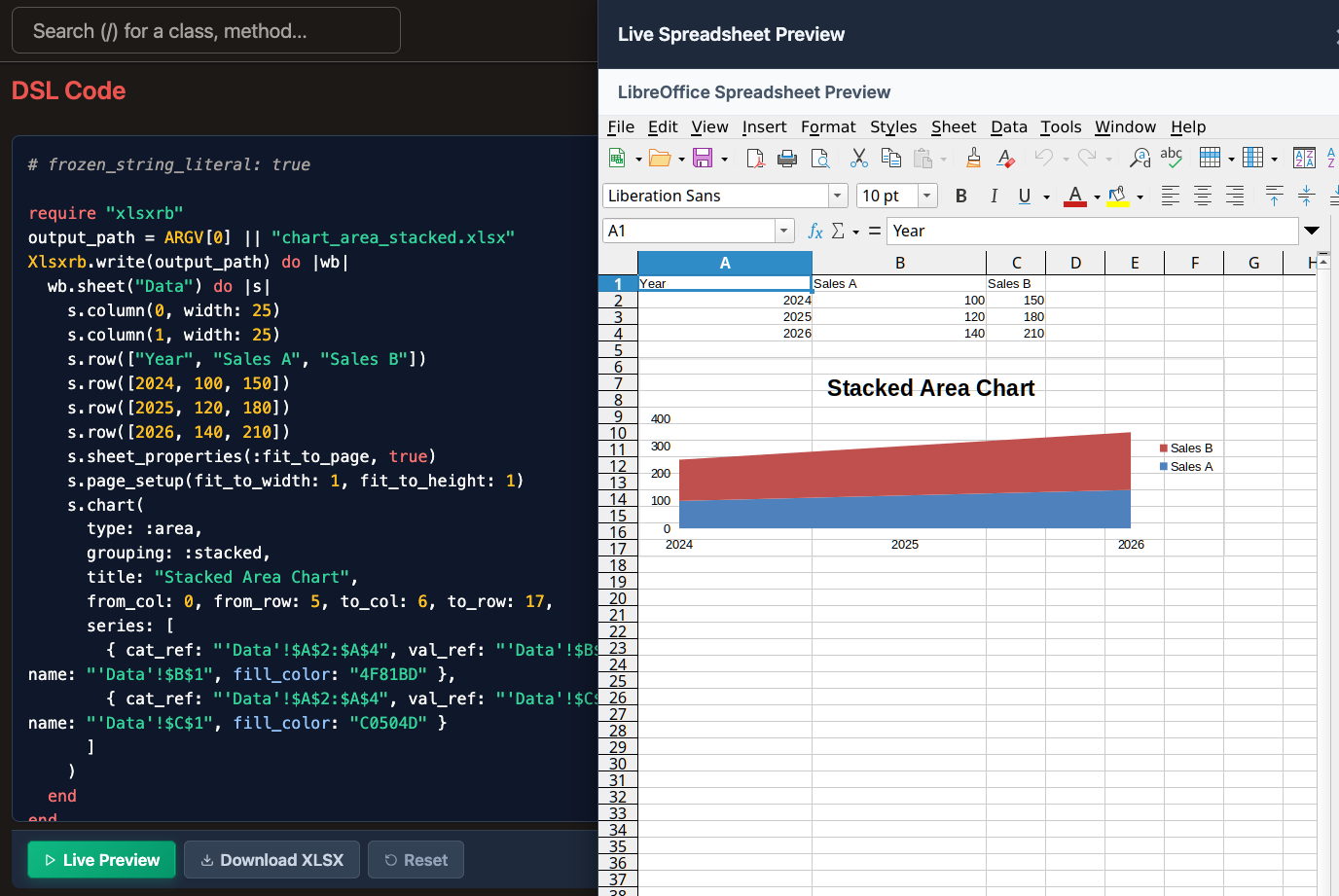
You can also browse 50+ rendered visual examples across all features in the Visual Examples Gallery.
Usage
Quick Start: Streaming (Recommended for Large Files)
Streaming Write ($O(1)$ Memory)
require "xlsxrb"

Xlsxrb.write("large_output.xlsx") do |writer|
  writer.sheet("Sales Data") do |sheet|
    sheet.row(["Date", "Amount", "Status"])
    sheet.row([Date.today, 100, true])
    sheet.column(0, width: 15.5)
  end
end
Streaming Read ($O(1)$ Memory)
require "xlsxrb"

Xlsxrb.read("large_file.xlsx") do |sheet|
  sheet.each_row do |row|
    row.each_cell do |cell|
      puts "#{cell.ref}: #{cell.value}"
    end
  end
end
In-Memory Building & Modifying
Creating & Exporting (Rails / Mailers)
require "xlsxrb"

wb = Xlsxrb.build do |b|
  b.sheet("Report") do |s|
    s.row(["Metric", "Value"])
    s.row(["Users", 1000])
  end
end

# Save to file or get binary string for Rails send_data
Xlsxrb.write("report.xlsx", wb)
binary_data = Xlsxrb.write(wb)
Modifying an Existing File
require "xlsxrb"

Xlsxrb.modify("template.xlsx", "output.xlsx") do |workbook|
  workbook.update_sheet("Invoice") do |sheet|
    sheet.update_cell("C4", value: "INV-10042")
         .update_cell("C5", value: Date.today)
  end
end
Password Protection & Encryption ([MS-OFFCRYPTO])
Natively supports reading and writing encrypted XLSX files (Standard & Agile Encryption) with zero external C-extensions:
require "xlsxrb"

# Write password-protected file
Xlsxrb.write("confidential.xlsx", password: "SecretPassword123") do |writer|
  writer.sheet("Financials") { |sheet| sheet.row(["Assets", 5_000_000]) }
end

# Read password-protected file
Xlsxrb.read("confidential.xlsx", password: "SecretPassword123") do |sheet|
  sheet.each_row { |row| puts row.cells.map(&:value) }
end
IDE Autocompletion & Ruby LSP Support
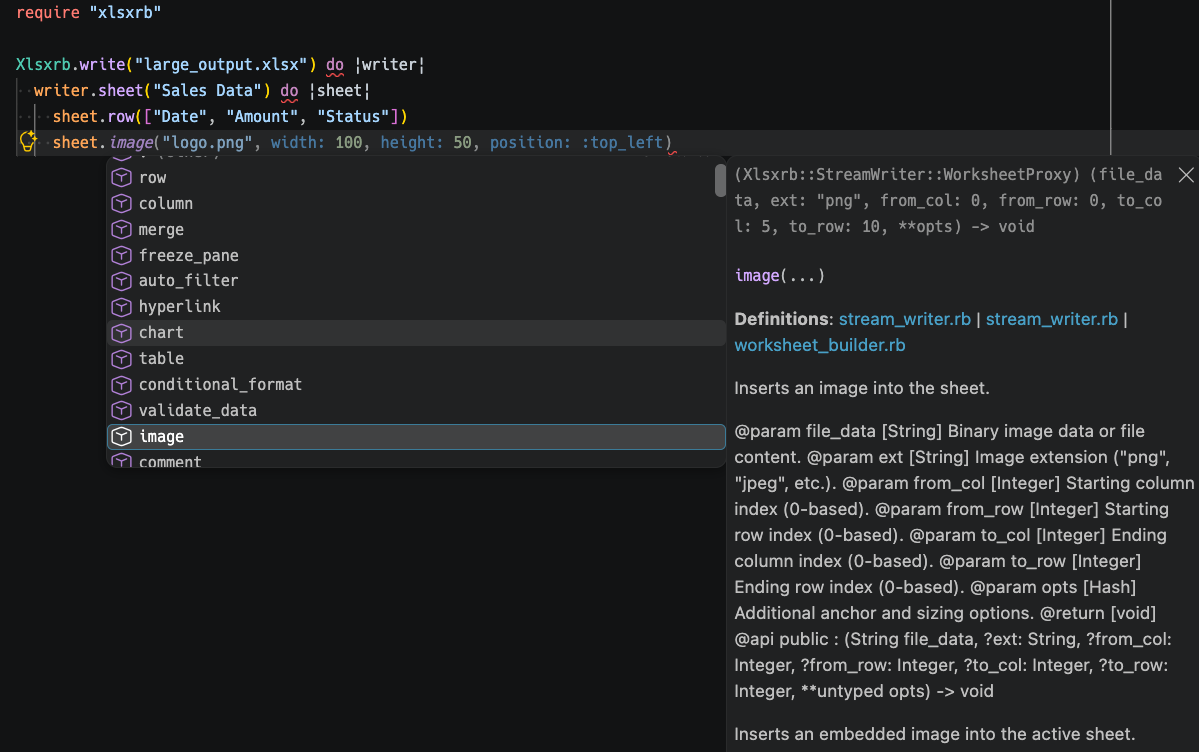
Includes a native Ruby LSP Add-on and full RBS signatures for zero-configuration method autocompletion and hover documentation in VS Code and other editors:
Feature Support & ECMA-376 Compliance
xlsxrb supports standard spreadsheet features: * Layout & Structure: Formulas, Hyperlinks, Merge Cells, Freeze/Split Panes, Page Setup, Auto Filters, Data Validations, Sheet/Workbook Protection. * Styling & Media: Rich Text, Cell Styles & Fills, Conditional Formatting (color scales, data bars), Embedded Images, Charts (Line, Bar, Pie, Radar, Scatter).
For full details, see docs/SPEC_SOURCES.md.
Benchmarks
Benchmark processing 1,000,000 cells (100,000 rows × 10 cols) across popular Ruby gems:
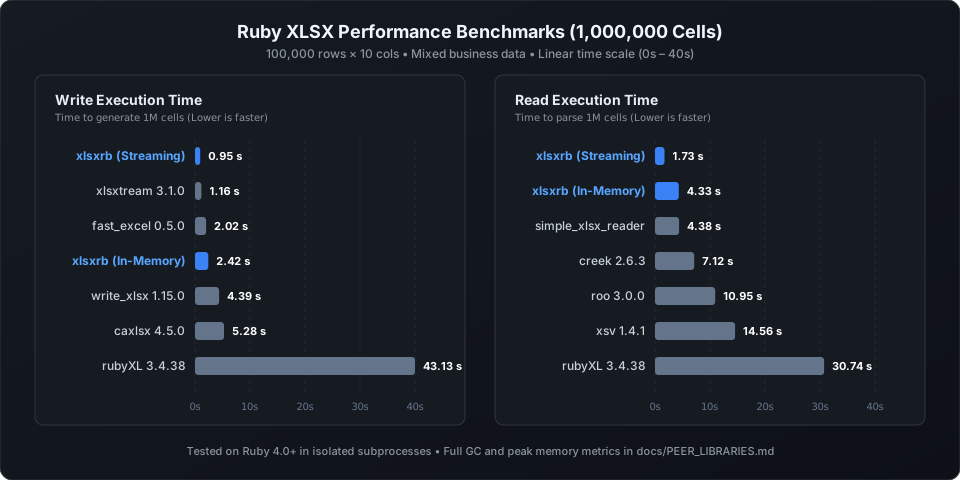
For detailed metrics (peak memory, GC count, mean/median times) and architectural tradeoffs (SST vs. Inline Strings), see docs/PEER_LIBRARIES.md.
To reproduce locally: ruby benchmark.rb 100000 10
Quality Assurance & Testing
Verified by a multi-layered QA architecture: * Microsoft Open XML SDK Validation: Validates generated OOXML structures against Microsoft’s official SDK. * Visual Regression Testing (VRT): Headless LibreOffice Calc pixel-by-pixel rendering checks. * Contract & Round-Trip Tests: Verifies parity between Streaming and In-Memory APIs and round-trip read/write accuracy. * Mutation Testing (Mutant): 100% mutant kill rate (1,091/1,091 mutations across 38 subjects) on pure algorithms, predicates, and coordinates (docs/MUTATION_TESTING.md). * Security & DoS Protection: Formula injection mitigation and ZIP bomb protection.
For full architectural details, see docs/ARCHITECTURE.md and docs/QUALITY_ASSURANCE.md.
Development & Contributing
See docs/DEVELOPMENT.md for local setup (Dev Container support), testing workflows, and contribution guidelines.
License
The gem is available as open source under the terms of the MIT License.