Xlsxrb

A Ruby library for reading and writing XLSX files with streaming support.

Motivation

The Ruby ecosystem already has great XLSX libraries. Each is well-designed for its purpose:

Library Read Write Streaming (low memory)
roo
creek
xsv
caxlsx / axlsx
xlsxtream
rubyXL
fast_excel

Each of these libraries makes deliberate tradeoffs, and they do so thoughtfully. Some focus exclusively on highly efficient reading or writing by streaming data, while others provide a rich API for complex, in-memory document modifications.

xlsxrb is for cases where you need both reading and writing in a single library, while also keeping memory usage predictable for large files.

Design Principles

Installation

bundle add xlsxrb

Or without Bundler:

gem install xlsxrb

On Ruby 4+, some components used by xlsxrb and its test suite are shipped as bundled gems rather than built-in default libraries. When using Bundler, those bundled gems are resolved and installed in the usual way.

Interactive Playground (WebAssembly)

You can try xlsxrb directly in your browser without installing anything!

We have integrated an interactive WebAssembly-powered playground into our RDoc documentation. You can edit the code examples, run them in the browser sandbox, and download the generated .xlsx spreadsheets immediately.

To launch the playground locally: 1. Generate the WebAssembly bundle and interactive RDoc: bash bundle exec rake doc 2. Start the local preview server: bash bundle exec rake doc:preview 3. Open http://localhost:8000 in your browser and click the “Try it in Browser” button on any code example!

Usage

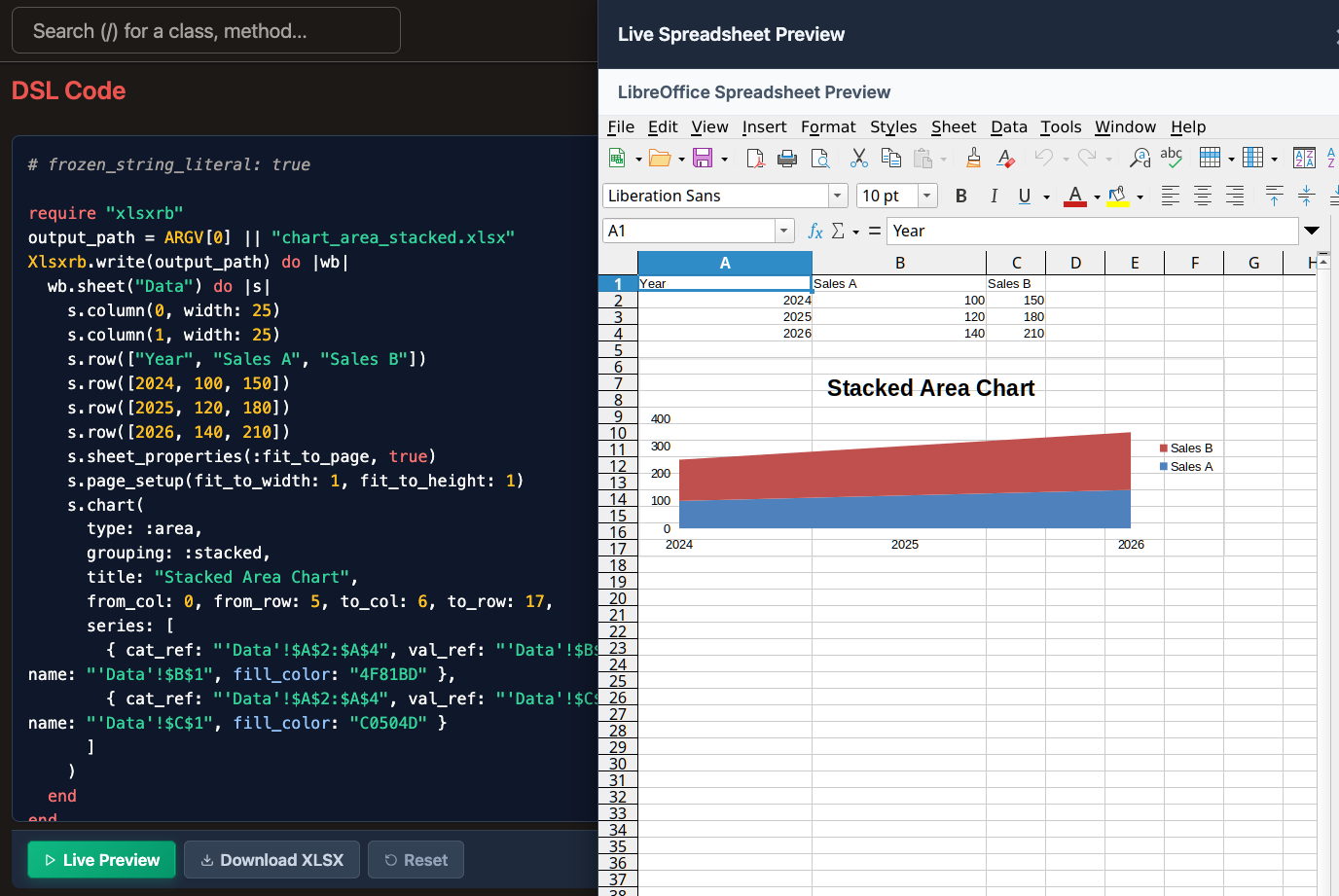
For visual demonstrations of various features and their generated output side-by-side with code examples, check the Visual Examples Gallery.

xlsxrb offers two different approaches to reading and writing XLSX files: Streaming and In-Memory.

In most cases, the Streaming approach is the best choice because it is highly memory efficient, avoiding loading entire files or structures into RAM. You should always try the Streaming approach first.

However, if your use case requires Random Access (e.g., reading a cell at Z100, then returning to A1) or you need to build or modify an entire document iteratively before writing, the In-Memory approach is required.

Streaming Read

Read rows one at a time without loading the entire file into memory:

require "xlsxrb"

# Yields Xlsxrb::Elements::Row objects for the first sheet
Xlsxrb.foreach("large_file.xlsx", sheet: 0) do |row|
  puts "Row #{row.index}: #{row.cells.map(&:value).join(', ')}"
end

Streaming Write

Generate large files efficiently by writing data directly to the file stream:

require "xlsxrb"

Xlsxrb.generate("large_output.xlsx") do |writer|
  writer.add_sheet("Sales Data") do
    writer.add_row(["Date", "Amount", "Status"])
    writer.add_row([Date.today, 100, true])
    writer.set_column(0, width: 15.5)
  end
end

For more advanced streaming features (such as adding charts, sparklines, or complex styling during stream generation), see the Visual Examples Gallery.

2. In-Memory

Reading into memory

Parse the entire workbook for random access by cell reference:

require "xlsxrb"

workbook = Xlsxrb.read("example.xlsx")
sheet = workbook.sheets.first

# Random access by cell reference
puts "Value at C10: #{sheet.cell_value("C10")}"

Writing from memory

Construct a workbook hierarchy in memory using the DSL and write it:

require "xlsxrb"

workbook = Xlsxrb.build do |w|
  w.add_sheet("My Sheet") do |s|
    s.add_row(["Hello", "World"])
  end
end

Xlsxrb.write("output.xlsx", workbook)

Modifying an existing workbook

Read an existing file, make changes, and write it back:

require "xlsxrb"

Xlsxrb.modify("template.xlsx", "output.xlsx") do |wb|
  sheet = wb.sheet(0)
  row0 = sheet.row_at(0)

  new_cell = Xlsxrb::Elements::Cell.new(row_index: 0, column_index: 1, value: "Updated")
  new_row = row0.with(cells: row0.cells.map { |c| c.column_index == 1 ? new_cell : c })
  new_sheet = sheet.with(rows: sheet.rows.map { |r| r.index == 0 ? new_row : r })

  wb.with(sheets: wb.sheets.map.with_index { |s, i| i == 0 ? new_sheet : s })
end

For details on adding charts or shapes in-memory, see the Visual Examples Gallery.

Specification

Sheet Features

All sheet-level features work identically in both the streaming (Xlsxrb.generate) and in-memory (Xlsxrb.build) APIs. Detailed code examples, runnable scripts, and side-by-side visual rendering results (screenshots) for all sheet-level features are available in the Visual Gallery (docs/visual/VisualGallery.md).

Workbook Features

Workbook-level methods are called directly on the writer/builder object (not inside add_sheet).

Defined Names, Print Area, and Print Titles

Xlsxrb.generate("named.xlsx") do |w|
  w.add_sheet("Data") do |s|
    s.add_row(["Name", "Score"])
    s.add_row(["Alice", 95])
  end

  # General named range
  w.add_defined_name("TaxRate", "0.1", hidden: false)

  # Print area for the sheet named "Data"
  w.set_print_area("A1:B10", sheet: "Data")

  # Repeat first row and first column when printing
  w.set_print_titles(rows: "1:1", cols: "A:A", sheet: "Data")
end

Workbook Protection

Lock the workbook structure (prevents adding/removing/renaming sheets).

Xlsxrb.generate("locked_workbook.xlsx") do |w|
  w.add_sheet("Sheet1") { |s| s.add_row(["Data"]) }

  w.set_workbook_protection(lock_structure: true, lock_windows: false)
end

Document Properties (Core, App, and Custom)

Embed metadata into the XLSX file’s document properties panels.

Xlsxrb.generate("with_props.xlsx") do |w|
  w.add_sheet("Sheet1") { |s| s.add_row(["Hello"]) }

  # Core properties (Dublin Core — visible in File > Info)
  w.set_core_property(:title,    "Quarterly Report")
  w.set_core_property(:subject,  "Sales data Q1 2026")
  w.set_core_property(:creator,  "Alice")
  w.set_core_property(:keywords, "sales, report, 2026")
  w.set_core_property(:description, "Auto-generated by xlsxrb")

  # App properties (application-level metadata)
  w.set_app_property(:application, "MyApp/2.0")
  w.set_app_property(:company,     "Acme Corp")

  # Custom properties (arbitrary key/value pairs)
  w.add_custom_property("ReportVersion", "42", type: :integer)
  w.add_custom_property("ApprovedBy",    "Bob", type: :string)
  w.add_custom_property("Published",     true,  type: :bool)
end

This project aims to be compliant with ECMA-376 (Office Open XML file formats). Specifically, the library targets the Transitional version of the specification rather than the Strict version. The Transitional version (detailed in Part 4) is the format most commonly produced and consumed by existing spreadsheet applications, making it the practical choice for real-world interoperability.

For detailed specification references and policies, see SPEC_SOURCES.md.

Benchmarks

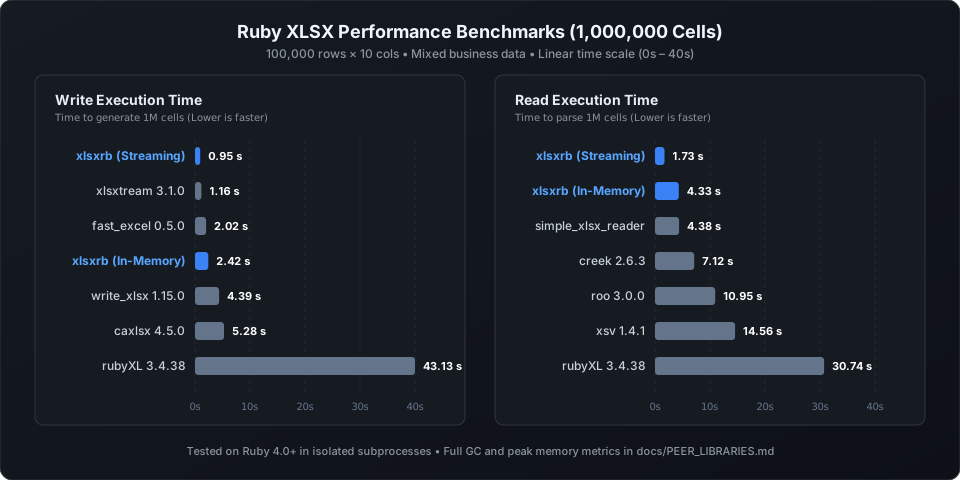
The following benchmarks measure the time and memory required to process both 100,000 cells (10,000 rows × 10 columns) and 1,000,000 cells (100,000 rows × 10 columns) XLSX files, averaged over 5 iterations on Ruby 3.4+.

Write Performance (100,000 cells)

Library Time Peak Memory GC Count
xlsxtream (Streaming) 0.15 s 65.0 MB 4.4
fast_excel (Streaming) 0.28 s 64.4 MB 2.0
xlsxrb (Streaming) 0.34 s 64.4 MB 19.0
caxlsx (In-Memory) 1.19 s 73.8 MB 5.0
xlsxrb (In-Memory) 3.06 s 132.4 MB 34.0
rubyXL (In-Memory) 5.45 s 274.8 MB 33.0

Read Performance (100,000 cells)

Library Time Peak Memory GC Count
xlsxrb (Streaming) 1.02 s 67.4 MB 192.0
creek (Streaming) 1.32 s 160.4 MB 396.8
roo (Streaming) 1.33 s 87.4 MB 31.0
xlsxrb (In-Memory) 1.82 s 153.9 MB 20.0
xsv (Streaming) 3.51 s 92.1 MB 98.0
rubyXL (In-Memory) 4.95 s 265.9 MB 38.0

Write Performance (1,000,000 cells)

Library Time Peak Memory GC Count
xlsxtream (Streaming) 0.11 s 65.1 MB 4.2
fast_excel (Streaming) 2.26 s 64.4 MB 28.0
xlsxrb (Streaming) 3.82 s 79.0 MB 199.0
caxlsx (In-Memory) 4.52 s 142.9 MB 15.6
xlsxrb (In-Memory) 11.61 s 454.5 MB 61.4
rubyXL (In-Memory) 86.63 s 2072.0 MB 91.4

Read Performance (1,000,000 cells)

Library Time Peak Memory GC Count
xlsxrb (Streaming) 11.05 s 102.9 MB 582.0
roo (Streaming) 13.20 s 127.9 MB 233.4
xsv (Streaming) 15.35 s 94.3 MB 984.4
creek (Streaming) 15.69 s 706.5 MB 3974.6
xlsxrb (In-Memory) 25.23 s 991.7 MB 41.4
rubyXL (In-Memory) 56.26 s 1858.3 MB 127.0

For reference, the following specification files from the Ecma International website are located in the vendor/docs/ directory:

Testing Strategy

To ensure high quality and strict compliance with the ECMA-376 specification while maintaining a fast development loop, we employ a 4-tier testing strategy:

  1. Unit Tests (Fast & No Dependencies):

  2. Verify individual components (Writer, Reader, Packaging) using only the Ruby standard library and bundled gems.

  3. Round-Trip Testing: Ensure that files generated by the xlsxrb Writer can be seamlessly and accurately parsed back by the xlsxrb Reader.

  4. Run via: bundle exec rake test:unit

  5. Contract Tests (API Consistency):

  6. Execute the same data scenario through both the Streaming (Xlsxrb.generate) and In-Memory (Xlsxrb.build + Xlsxrb.write) APIs.

  7. Verify that both APIs produce semantically identical OOXML output.

  8. Run via: bundle exec rake test:contract

  9. Interoperability Testing (E2E):

  10. Utilize the official Open XML SDK for robust, two-way verification:

    • Writer Validation: Files generated by xlsxrb are read and validated using the Open XML SDK validator.

    • Reader Validation: Complex, real-world XLSX files generated by the SDK are parsed and verified by the xlsxrb reader.

  11. Requires .NET SDK.

  12. Run via: bundle exec rake test:e2e

  13. Visual Examples & VRT (Visual Regression Testing):

  14. Visual Gallery: Automatically compiles example DSL scripts under examples/visual/ into the Visual Examples Gallery.

  15. Visual Regression Testing: Renders generated spreadsheets to PNGs using a headless LibreOffice Calc engine, and compares them against baselines to catch rendering errors or layout regressions.

  16. Requires libreoffice-calc, poppler-utils (pdftoppm), and imagemagick.

  17. Run via: bundle exec rake test:visual

Note on Test Environments: All necessary dependencies (.NET SDK, LibreOffice, etc.) are pre-configured in the repository’s Dev Container setup for a consistent local and CI experience.

Development

This project is designed to be developed using Dev Containers. The provided .devcontainer configuration includes all necessary tools (Ruby 4.0, and the .NET SDK for E2E testing) to ensure a consistent development environment.

After checking out the repo, run bin/setup to install dependencies. Then, run rake test to run the tests. You can also run bin/console for an interactive prompt that will allow you to experiment.

Development Workflow

High-level API expansion follows the Facade rules documented in docs/ARCHITECTURE.md. In short: if a low-level writer feature is stable, the default expectation is that it should eventually be exposed through the high-level DSL as well, with consistent naming, both streaming and in-memory coverage, backward-compatible options/block forms where practical, and matching Facade-level tests.

To ensure systematic progress, perfect round-trip compatibility, and strict adherence to the ECMA-376 specification, we follow this iterative development cycle for each new feature:

  1. Select a Feature: Choose a specific element or behavior from the specification to implement.

  2. Writer Unit Tests: Write unit tests for the Writer component targeting this feature.

  3. Writer Implementation: Implement the Writer functionality.

  4. Run Writer Tests: Execute the Writer unit tests. If they fail, return to step 3.

  5. Writer E2E & Validation: Test the Writer’s generated XLSX file using the Open XML SDK. This includes structural validation using OpenXmlValidator. If the test or validation fails, return to step 2.

  6. Reader Unit Tests: Write unit tests for the Reader component. Crucially, include round-trip tests to ensure the Reader can perfectly parse the output of your Writer.

  7. Reader Implementation: Implement the Reader functionality.

  8. Run Reader Tests: Execute the Reader unit tests. If they fail, return to step 6 or 7. If the round-trip test reveals a structural flaw in the Writer’s output, return all the way back to step 2.

  9. Reader E2E: Verify that the Reader can successfully parse a valid XLSX file generated by the Open XML SDK that includes the new feature. If it fails, return to step 6 or 7.

  10. Full Test Suite: Run the entire test suite (rake test). If any tests fail, trace back to the appropriate step.

  11. Commit: Commit the changes. The commit message must clearly describe the specific feature implemented in this cycle.

  12. Next Feature: Proceed to the next feature and return to step 1.

E2E Policy

E2E tests are required for every new feature. Omitting them is the exception, not the rule, and requires explicit justification.

A strong signal that E2E should not be omitted: if you are adding a new XML element, a new attribute on a top-level structure, or a new public API parameter, E2E is expected.

Omission is only acceptable when all of the following hold:

  1. The change adds a minor attribute to an XML structure that is already exercised end-to-end by an existing E2E scenario for the same element.

  2. No new XML element or branch is introduced.

  3. Unit tests and round-trip tests fully cover the new behaviour.

  4. rake test passes with Open XML SDK validation included.

  5. The commit message explicitly names the existing E2E scenario that provides coverage and states why a new scenario adds no value.

To install this gem onto your local machine, run bundle exec rake install. To release a new version, update the version number in version.rb, and then run bundle exec rake release, which will create a git tag for the version, push git commits and the created tag, and push the .gem file to rubygems.org.

Contributing

Bug reports and pull requests are welcome on GitHub at github.com/niku/xlsxrb. This project is intended to be a safe, welcoming space for collaboration, and contributors are expected to adhere to the code of conduct.

License

The gem is available as open source under the terms of the MIT License.

Code of Conduct

Everyone interacting in the Xlsxrb project’s codebases, issue trackers, chat rooms and mailing lists is expected to follow the code of conduct.