Xlsxrb
A Ruby library for reading and writing XLSX files with streaming support.
Drop-in compatibility adapters for peer Ruby XLSX libraries are available at xlsxrb-adapters.
Motivation
The Ruby ecosystem has several XLSX libraries designed for specific tradeoffs:
| Library | Read | Write | Streaming | In-Memory |
|---|---|---|---|---|
| roo | Yes | - | - | Yes |
| creek | Yes | - | Yes | - |
| xsv | Yes | - | Yes | - |
| simple_xlsx_reader | Yes | - | Yes | - |
| caxlsx / axlsx | - | Yes | - | Yes |
| write_xlsx | - | Yes | - | Yes |
| xlsxtream | - | Yes | Yes | - |
| fast_excel | - | Yes | Yes | - |
| rubyXL | Yes | Yes | - | Yes |
| xlsxrb | Yes | Yes | Yes | Yes |
These libraries make different architectural tradeoffs: * Streaming Model: Writes or reads rows sequentially on-the-fly to maintain a low-memory footprint regardless of dataset size. * In-Memory Model: Builds a complete document object model, offering flexible random access, cell updates, and document templates at the cost of memory usage on large spreadsheets.
Maintaining a gem that supports both reading and writing across streaming and in-memory models, alongside OOXML features and specification compatibility, involves significant ongoing maintenance overhead.
xlsxrb addresses this through automated workflows: AI coding agents handle routine maintenance tasks such as end-to-end testing, visual regression testing, schema compliance checks, and documentation synchronization, enabling sustainable maintenance of both streaming and in-memory architectures.
Design Principles
-
Zero Runtime Dependencies: Built strictly on the Ruby standard library and bundled gems (
zlib,rexml, etc.) with zero third-party runtime dependencies. -
Streaming Support: Low-memory row streaming for reading and writing spreadsheets ($O(1)$ memory on reads; writes buffer unique shared strings).
-
OpenXML Interoperability: Compliant with ISO/IEC 29500 (ECMA-376) and validated against the Microsoft Open XML SDK.
-
AI-Assisted Maintenance: Uses AI coding agents for automated quality assurance and verification workflows. Operational guidelines are defined in AGENTS.md.
-
Ruby 3.4+: Requires Ruby 3.4 or higher.
Autonomous Quality Assurance
To maintain its multi-layered QA suite (Steep static typing, 100% mutation kill rate across 51 subjects, ECMA-376 XSD validation, and $O(1)$ streaming memory) without high manual maintenance overhead, xlsxrb defines remediation workflows for AI coding agents (AGENTS.md, docs/QA_AGENTS.md).
Installation
bundle add xlsxrb
# Or without Bundler: gem install xlsxrb
Upgrading from 0.1.x: see docs/UPGRADING-0.2.md for removed APIs, their replacements, and changed defaults.
Interactive Playground (WebAssembly)
Try xlsxrb directly in your browser without installing anything!
Try the Live Demo / Interactive Playground
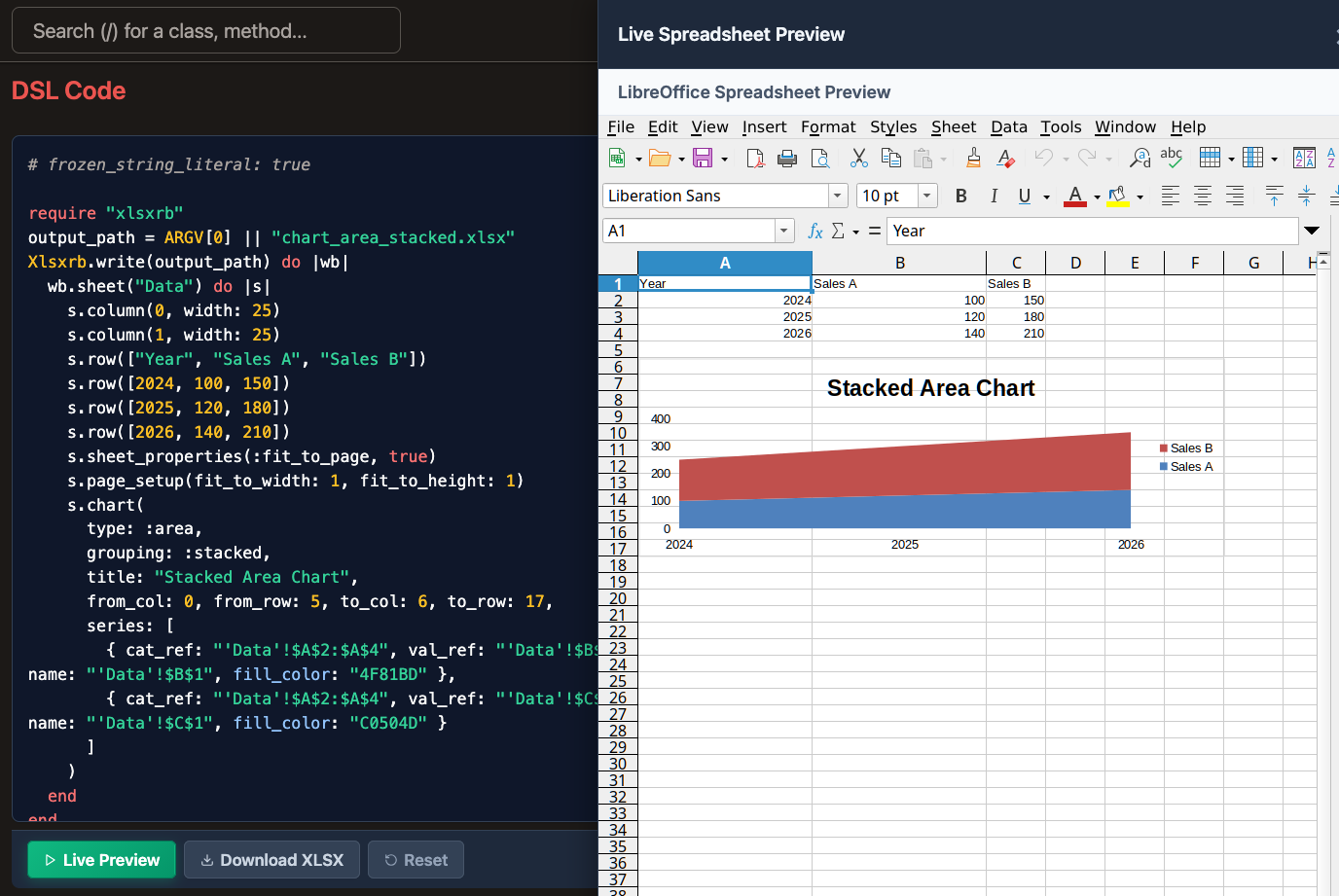
You can also browse 80+ rendered visual examples across all features in the Visual Examples Gallery.
Usage
I/O Architecture Matrix
xlsxrb provides four canonical entry points organized along two axes:
| Axis | Streaming ($O(1)$ Memory) | In-Memory (Full Random Access) |
|---|---|---|
| Read / Input | Xlsxrb.read(source) { |sheet| ... } |
Xlsxrb.load(source) -> Elements::Workbook |
| Write / Output | Xlsxrb.write(dest) { |writer| ... } |
Xlsxrb.build { |builder| ... } -> Elements::Workbook |
Streaming Read ($O(1)$ Memory)
Iterates rows sequentially without loading the full document into memory. Closes the underlying archive automatically upon block completion:
require "xlsxrb"

Xlsxrb.read("large_file.xlsx") do |sheet|
  sheet.each_row do |row|
    row.each_cell do |cell|
      puts "#{cell.ref}: #{cell.value}"
    end
  end
end
Reading from a File or from Memory
Xlsxrb.read and Xlsxrb.load take the workbook from a file path or from a stream:
| Source | Pass | Example |
|---|---|---|
| A file | Its path, as a String | Xlsxrb.load("workbook.xlsx") |
| xlsx data in memory, such as an upload | A stream (an IO) | Xlsxrb.load(StringIO.new(data)) |
| An open file | The IO | File.open("workbook.xlsx", "rb") { |file| Xlsxrb.load(file) } |
require "xlsxrb"
require "stringio"

# In a web application: read the uploaded workbook, not a file named by the upload.
workbook = Xlsxrb.load(StringIO.new(params[:file].read))
A String is a file path. Passing xlsx data as a String still works in 0.2 and warns: xlsxrb tells the two apart by the content of the String, so data that someone else supplied can be made to name a file on the machine instead (ADR 0012). From 0.3.0 a String is always a path. A path that comes from someone you do not trust opens whatever it names; check it before passing it, as with File.open.
Streaming Write (Low Memory)
Pipes row and cell XML directly to the archive without buffering rows in memory:
require "xlsxrb"

Xlsxrb.write("large_output.xlsx") do |writer|
  writer.sheet("Sales Data") do |sheet|
    sheet.column(0, width: 15.5)
    sheet.row(["Date", "Amount", "Status"])
    sheet.row([Date.today, 100, true])
  end
end
In-Memory Load (Full Random Access)
Parses the workbook into an immutable document model (Elements::Workbook) and immediately closes the underlying file:
require "xlsxrb"

wb = Xlsxrb.load("workbook.xlsx")
sheet = wb["Sheet1"]

puts sheet["A1"].value
puts sheet.page_setup.orientation
puts sheet.hyperlinks["B2"].url
In-Memory Build (Document Creation)
Constructs an in-memory Elements::Workbook using the declarative builder DSL:
require "xlsxrb"

wb = Xlsxrb.build do |b|
  b.sheet("Report") do |s|
    s.row(["Metric", "Value"])
    s.row(["Users", 1000])
  end
end

# Save to file or get binary string for Rails send_data
Xlsxrb.write("report.xlsx", wb)
binary_data = Xlsxrb.write(wb)
Constant-Memory Streaming Transformation
To transform or filter data from an existing spreadsheet, stream rows from reader to writer in $O(1)$ memory:
require "xlsxrb"

Xlsxrb.write("output.xlsx") do |out_wb|
  out_wb.sheet("Processed") do |out_sheet|
    Xlsxrb.read("input.xlsx") do |in_sheet|
      in_sheet.each_row do |row|
        # type_cast: true turns date-formatted cells into Date/Time (so they are not
        # scaled as numbers) and keeps empty cells as nil in their column.
        out_sheet.row(row.values(type_cast: true).map { |v| v.is_a?(Numeric) ? v * 1.1 : v })
      end
    end
  end
end
This copies cell values only. Styles, number formats other than dates, formulas, merged cells, and column widths are not carried over; set them on the writer if the output needs them.
Template Migration & AI Code Generation
Xlsxrb.modify was removed in 0.2.0 in favor of Xlsxrb.read -> Xlsxrb.write and Xlsxrb.load. Runtime data transformations are handled with streaming pipelines (Xlsxrb.read -> Xlsxrb.write), while template-based report generation is performed by converting templates into declarative Xlsxrb.write DSL scripts.To migrate an existing Excel template (template.xlsx) into reproducible Ruby code, inspect the template structure with Xlsxrb.load and provide it to an AI coding assistant:
require "xlsxrb"

wb = Xlsxrb.load("template.xlsx")
sheet = wb.sheets.first

# Inspect layout, formulas, and column widths
puts "Columns: #{sheet.columns.map { |c| [c.index, c.width] }}"
puts "Merged: #{sheet.merged_cells}"
puts "Formulas: #{sheet.rows.flat_map(&:cells).select(&:formula?).map { |c| [c.ref, c.formula] }}"
Recommended AI Prompt for Template Migration:
“Convert this Excel template into an
Xlsxrb.writebuilder script using xlsxrb DSL methods (row,column,merge,style,formula). Ensure cell styles, column widths, number formats, and formulas match the inspected template layout.”
Password Protection & Encryption ([MS-OFFCRYPTO])
Reads files encrypted with Standard or Agile encryption and writes encrypted files, without external C extensions:
require "xlsxrb"

# Write password-protected file
Xlsxrb.write("confidential.xlsx", password: "SecretPassword123", encryption_mode: :agile) do |writer|
  writer.sheet("Financials") { |sheet| sheet.row(["Assets", 5_000_000]) }
end

# Read password-protected file
Xlsxrb.read("confidential.xlsx", password: "SecretPassword123") do |sheet|
  sheet.each_row { |row| puts row.cells.map(&:value) }
end
encryption_mode: :agile writes AES-256 with a check that the file is unchanged, which Excel 2010 and later open. Without it, 0.2 writes Standard encryption (AES-128, no such check); from 0.3.0 a password always writes Agile encryption, and encryption_mode: :standard warns in 0.2 and is an error from 0.3.0 (ADR 0013). Files with either scheme are read.
Date and Time Handling
Excel stores dates and times as serial numbers (days since 1900, with the time of day as the fraction) and marks them as dates only through the cell’s number format. cell.value returns that serial number as an Integer or Float. To get dates back:
Xlsxrb.read("input.xlsx") do |sheet|
  sheet.each_row do |row|
    row.values(type_cast: true) # => ["Due", #<Date: 2026-01-02>, 2026-01-02 03:04:05 UTC]

    row.cells.each do |cell|
      next unless cell.date_format?

      cell.to_date # => Date
      cell.to_time # => Time in UTC
    end
  end
end
When writing, Date, Time, and DateTime values get a date or date-time number format automatically, also when the cell has a style without its own number_format.
Serial numbers carry no timezone, so to_time returns the wall-clock time as UTC. To interpret it in an application timezone (such as JST or America/New_York), build a local time from its components:
t = cell.to_time

# With ActiveSupport / Rails:
local_time = Time.zone.local(t.year, t.month, t.day, t.hour, t.min, t.sec)

# With Ruby standard library:
local_time = Time.local(t.year, t.month, t.day, t.hour, t.min, t.sec)
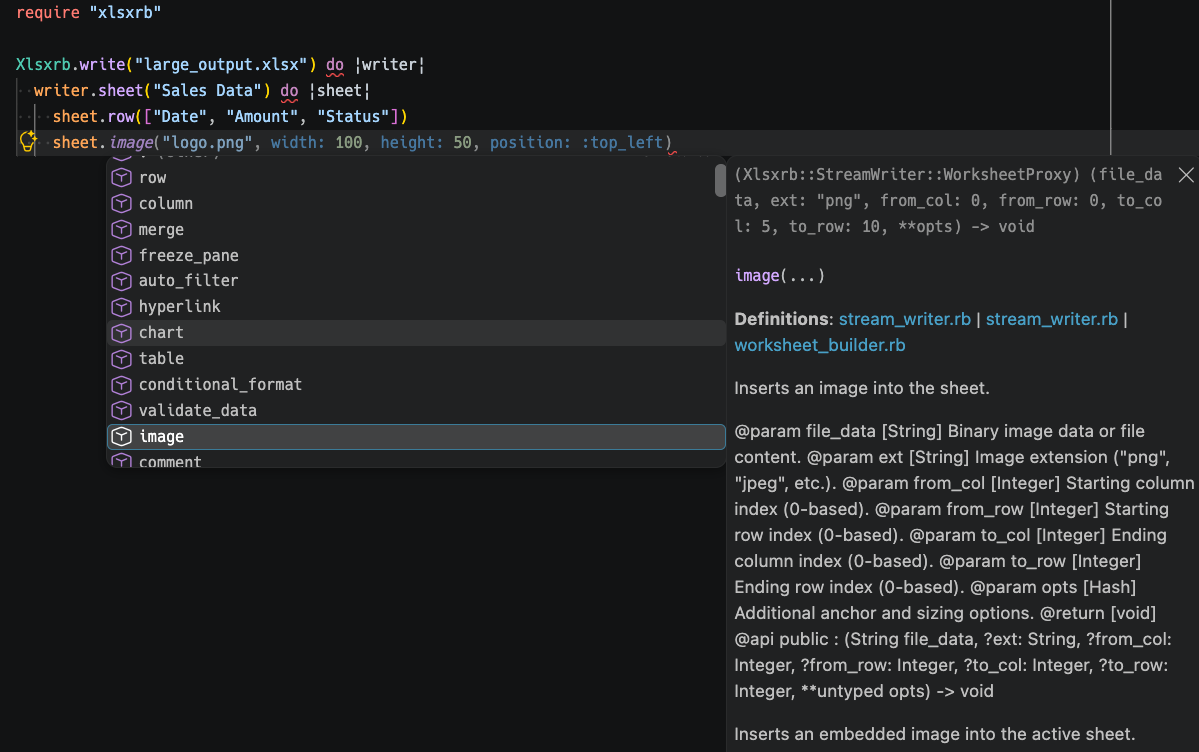
IDE Autocompletion & Ruby LSP Support
Includes a native Ruby LSP Add-on and full RBS signatures for zero-configuration method autocompletion and hover documentation in VS Code and other editors:
Feature Support & ECMA-376 Compliance
xlsxrb supports standard spreadsheet features: * Layout & Structure: Formulas, Hyperlinks, Merge Cells, Freeze/Split Panes, Page Setup, Auto Filters, Data Validations, Sheet/Workbook Protection. * Styling & Media: Rich Text, Cell Styles & Fills, Conditional Formatting (color scales, data bars), Embedded Images, Charts (Line, Bar, Pie, Radar, Scatter).
For full details, see docs/SPEC_SOURCES.md.
Benchmarks
Benchmark processing 1,000,000 cells (100,000 rows × 10 cols) across popular Ruby gems, with YJIT enabled for every library (Rails 7.2 and later enable YJIT by default):
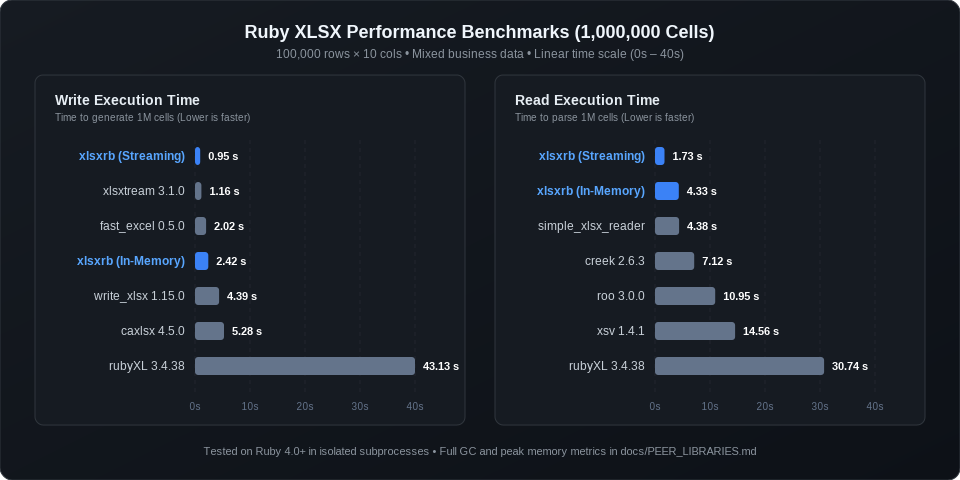
For detailed metrics (peak memory, GC count, mean/median times) and architectural tradeoffs (SST vs. Inline Strings), see docs/PEER_LIBRARIES.md.
To reproduce locally: RUBY_YJIT_ENABLE=1 ruby benchmark.rb 100000 10
Quality Assurance & Testing
Verified by a multi-layered QA architecture: * Microsoft Open XML SDK Validation: Validates generated OOXML structures against Microsoft’s official SDK. * Visual Regression Testing (VRT): Headless LibreOffice Calc pixel-by-pixel rendering checks. * Contract & Round-Trip Tests: Verifies parity between Streaming and In-Memory APIs and round-trip read/write accuracy. * Mutation Testing (Mutant): 100% mutant kill rate (2,549/2,549 mutations across 51 subjects) on pure algorithms, predicates, and coordinates (docs/MUTATION_TESTING.md). * Security & DoS Protection: Formula injection mitigation and ZIP bomb protection.
For full architectural details, see docs/ARCHITECTURE.md and docs/QUALITY_ASSURANCE.md.
Development & Contributing
See docs/DEVELOPMENT.md for local setup (Dev Container support), testing workflows, and contribution guidelines.
License
The gem is available as open source under the terms of the MIT License.